
Manage ALD participation
Intended audience: recipient coordinator transplant program admin
Liver recipients may be required to participate in an Alcohol-Associated Liver Disease (ALD) program before they are included in a liver allocation and offer.
The recipient’s liver journey must be paused while they are in the ALD program.
After the recipient leaves the ALD program, update their journey to reflect the outcomes of their participation in the program – the journey could resume, be terminated, or be paused for other reasons.
Note: The ALD Program Participation does not apply to paediatric liver recipients (<18 years). If a liver journey was created while the recipient was paediatric, the ALD Program Participation section will not be displayed, regardless of the recipient’s current age.
Pausing a liver journey for ALD program participation
Pause the recipient’s liver transplant journey while they are in an ALD program.
The approach to pausing the journey differs depending on the phase the journey is in.
Phase |
How to pause the liver transplant journey |
|---|---|
Referral |
Set a Referral Decision of Referral deferred. |
Consultation |
Set a Consultation Decision of Consultation delayed and a Reason of Abstinence from Substance. |
Medical Assessment |
Set a Medical Assessment Decision of Further treatment/testing required and a Reason of Alcohol treatment (ALD). |
Waitlist |
Place a medical hold: set a Medical status of 0 and a Reason for Medical Hold of ALD Related. |
Adding ALD information
Once the journey is paused, record when the recipient enters and leaves their ALD program.
Go to the recipient’s profile, select Liver and then select ALD Program Participation from the left side panel OR Scroll to the ALD Program Participation section.
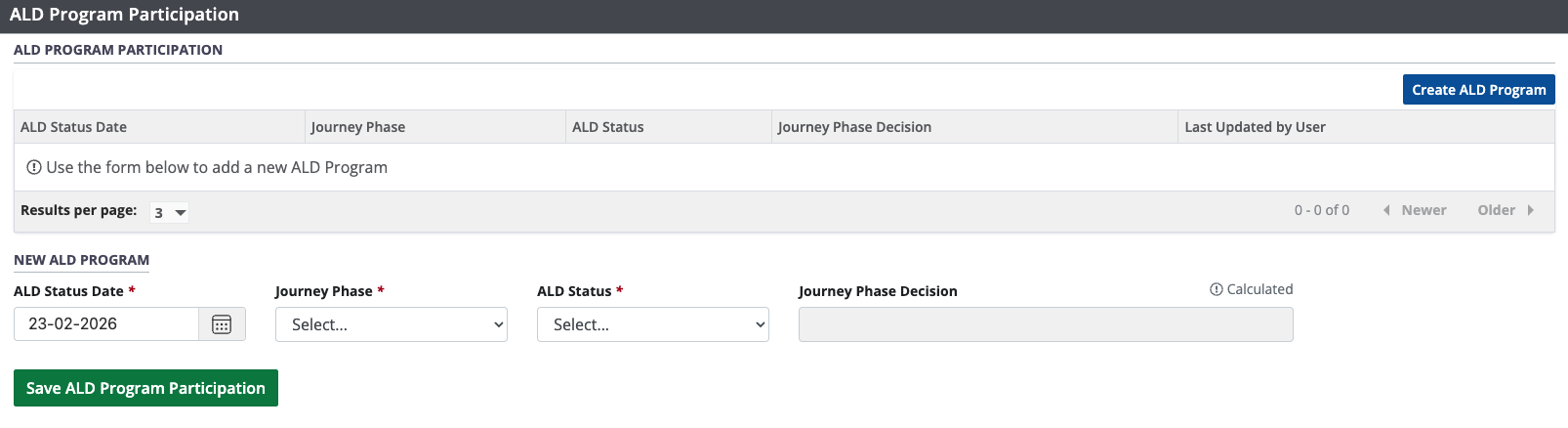
Select the Create ALD Program button.
-
Enter required information in the New ALD Program fields:
Provide an ALD Status Date.
Select a Journey Phase from the dropdown. (please see the table below for details on the ‘Journey Phase’ for ALD Program Participants).
Select the ALD Status from the dropdown.


-
Select the Save ALD Program Participation button.
To cancel, select the return to previous page icon or browse to any other page without saving. Any unsaved information is discarded.
Journey Phase | Definition |
|---|---|
Pre-Referral | Referral has been received but no Referral Decision has been recorded yet. Use when ALD Status Date precedes any Referral Decision. |
Referral | From the first Referral Decision date up to the start of Consultation. |
Consultation | From the first Consultation Decision date up to the start of Medical Assessment. |
Medical Assessment | From the first Medical Assessment Decision date up to waitlist. |
Waitlist | From the date the recipient is added to the waitlist and onward |
Note: The ALD Status field will also provide an option of ‘No Longer Participating’ when there is at least one entry in the ‘ALD Program Participation’ table. You must select ALD Status of ‘No Longer Participating’ when a liver recipient exits the ALD Program.
The system determines the Journey Phase Decision and updates automatically upon saving the ALD Program Participation data. The new ALD program participation information will be displayed in the ALD Program Participation table.
Note: When journey phase ‘Pre-Referral’ is selected, the calculated Journey Phase Decision field remains blank.
Viewing and editing historical ALD information
You can edit the most recent entry in the ALD Program Participation table, unless the organ journey is declined or cancelled. All previous entries are displayed in the table and are read-only.
Go to the recipient’s profile, select Liver and then select ALD Program Participation from the left side panel OR Scroll to the ALD Program Participation section.
Select any entry from the table of historical test results to see its details in the Selected ALD Program fields.
If this is the most recent entry, edit the information as required.
-
Select the Save ALD Program Participation button.
To cancel, select the return to previous page icon or browse to any other page without saving. Any unsaved information is discarded
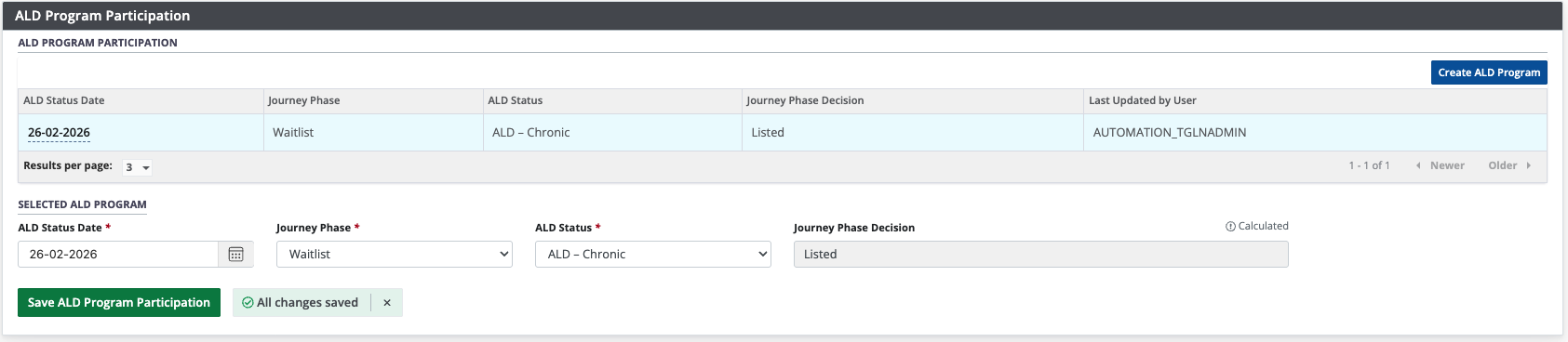
The system updates the selected entry in the ALD Program Participation table.
Updating a liver journey after ALD program participation
When the recipient completes their ALD program, restart or terminate their journey based on whether they were successful.
The way you restart or terminate the journey depends on the phase the journey is in.
If the recipient’s ALD participation was unsuccessful, but they are trying ALD again, leave the journey on pause and add a new ALD program to the ALD Program Participation table under Liver Specific Details.
Phase |
Successful ALD participation, and proceeding with transplantation |
Unsuccessful ALD participation, and no longer proceeding with transplantation |
|---|---|---|
Referral |
Set a Referral Decision of Referral accepted. |
Set a Referral Decision of Referral declined. |
Consultation |
Set a Consultation Decision of Consultation completed. |
Set a Consultation Decision of Consultation cancelled. |
Medical Assessment |
Set a Medical Assessment Decision of Recipient to be listed. |
Set a Medical Assessment Decision of Recipient not eligible for transplant.
|
Waitlist |
Remove the ALD-related Medical Hold to return to active waitlist status.
|
Remove the recipient from the waitlist.
|